A helpdesk for your customer email.
Customer emails to your shared inboxes become tickets your team answers together, from your own support address. Reply targets, saved replies and internal notes keep everyone on track. Built in Italy, under European law.
Included in Dazr Pro and Enterprise. 14 days free, cancel any time.
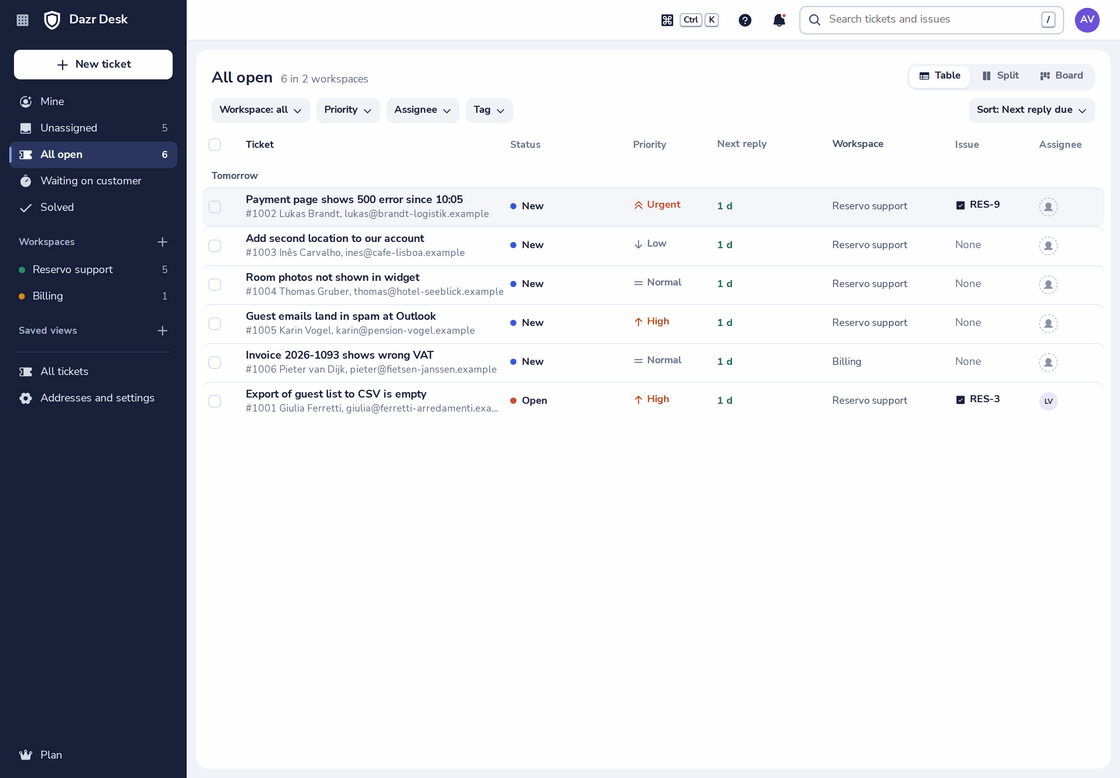
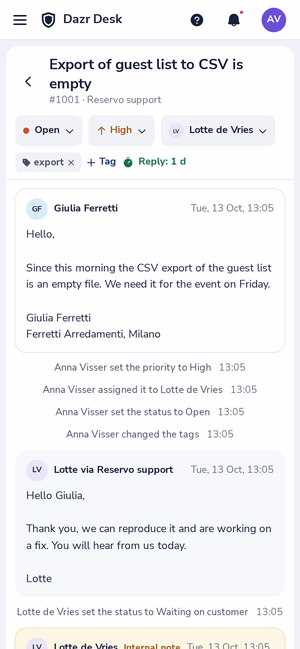
The queue of open tickets across two workspaces, sorted by when the next reply is due. On the right, a ticket on a phone.
The names you know.
What you use today, and where it is in Dazr Desk.
| What you know | In Dazr Desk |
|---|---|
| Ticket | Ticket, in a helpdesk workspace with its own addresses and people |
| Views and queues | The queue: Mine, Unassigned, All open, Waiting on customer, Solved, and views you save |
| SLA, first and next reply | Reply targets: next reply due and solved within, in business hours if you like |
| Macros, canned responses | Saved replies, with the customer’s name filled in |
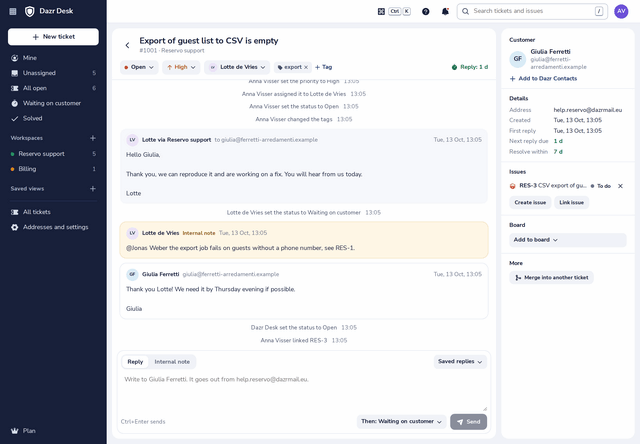
| Internal note | Internal note, with mentions |
| Merge | Merge into another ticket |
A helpdesk on your own mail.
Customers just email you. The mail stays in Dazr Mail, and each conversation becomes a ticket.
An admin picks which shared inboxes of your organisation turn into tickets. Every other address stays plain mail in Dazr Mail.
Support, billing, a large client: each workspace has its own addresses, people, reply targets and saved replies.
Answer from the ticket and the customer gets normal mail from your support address, threaded in their own mail app.
Write internal notes the customer never sees, and mention a colleague to bring them in.
New, open, waiting on customer, on hold and solved. When the customer writes back, the ticket opens again.
Targets for the first reply and for solving, counted in business hours if you like, without public holidays in 14 European countries.
Saved replies fill in the customer’s name, duplicates merge into one ticket, and you change many tickets at once.
A table, a split view or a board by status, with filters and views you save.
Tickets and issues, linked.
With Dazr Projects, support sees the fix coming and developers see the customer waiting.
Turn a customer report into an issue on a project board, linked both ways.
The ticket shows the status of every linked issue, so nobody has to ask.
A small job can sit on the board as the ticket itself, with the customer and the reply time on the card.
Switching, honestly.
There is no import from other tools yet. This is what the move involves.
Make it a shared inbox in Dazr Mail, on your company domain, and tick it in a workspace. From then on, new mail becomes tickets.
Earlier tickets are not copied over. Finish them in the old tool; when a customer writes again, the mail arrives in Dazr Desk.
Coming from another helpdesk? Want help planning the move? Book a call
Part of your Dazr apps.
Dazr Desk uses the people and the mail your company already has in Dazr.
The shared inboxes come from Dazr Mail. A conversation that is a ticket says so in Mail, with a link to the ticket.
A ticket assigned to you, a mention, a customer’s answer or a reply due within the hour shows in Dazr Teams. While you focus, it waits quietly.
Turn a ticket into an issue on a project board. The ticket shows its status, and you hear when it is done.
See the customer from your Dazr Contacts next to the ticket, or add them in one click.
Learn it on the real screen.
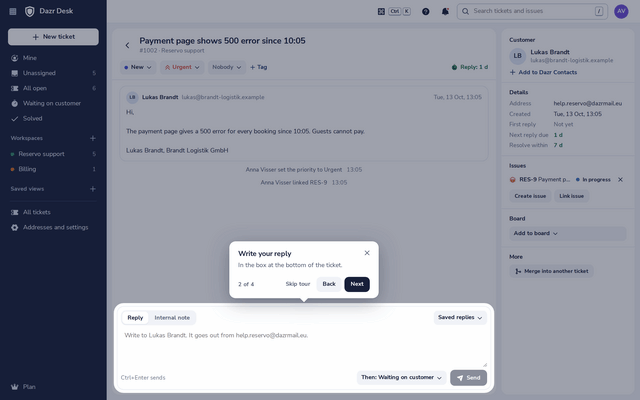
Set up a helpdesk or answer a ticket: open Help, the ? at the top, and a guided tour shows you each step on the real screen, in your language.
For everything else, the help centre has a step-by-step article with real screenshots.
European, through and through.
Your customers’ mail and your plans stay in Europe.
Tickets are stored encrypted on European infrastructure, by an Italian company, under European law.
The people come from your organisation in Dazr Identity. Leave the organisation and access ends at once.
There are no ads in Dazr Desk, and your data is never used for advertising.
The data processing agreement is included in every company plan. More in the trust centre.
Questions, answered.
Which plan includes Dazr Desk?
Dazr Pro and Enterprise. Pro costs €149 a month for 5 people and €25 for each one more, for up to 25 people; Enterprise costs €39 per person, from 10 people. Both also include Dazr Mail on your company domain, Teams, Calendar, Contacts, Files and Docs, Sheets and Slides. See pricing
Do my customers need an account?
No. They write to your address and get your replies as normal mail.
Which addresses become tickets?
Only the shared inboxes an admin of your organisation chooses for a workspace. Personal mailboxes and other addresses stay plain mail.
How many shared inboxes can we have?
Pro includes 2 shared inboxes in Dazr Mail; Enterprise has no limit.
Can we import from our current helpdesk?
Not yet. New mail becomes tickets as soon as your address is a shared inbox in Dazr Mail.
Do I need to install anything?
No. Dazr Desk runs in the browser on your computer and your phone.
Answer every customer, together.
Try Dazr Pro free for 14 days and set up your first helpdesk.